
XDS Front and Rear Images
Let Us Help You
I want to:See Images of The XDS Receiver Download PDF
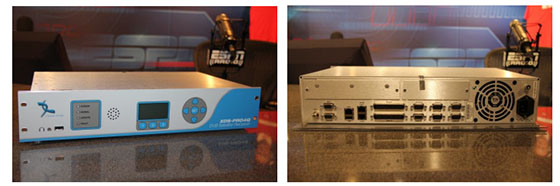
The XDS-PRO4-Q Receiver is the latest revision of the XDS family that ESPN Affiliates are using. For a greater detail of the receiver, please refer to the Quick Start Guide or the manufacturer manual. This is just a one sheet look at the most common use of the rear panel.
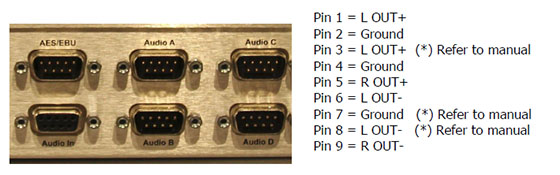
The rear panel connections are all easy connections to make. The audio is output on ports A-D and will be balanced analog. See the pinout below. Your DB9 connectors will need to be DB9F.
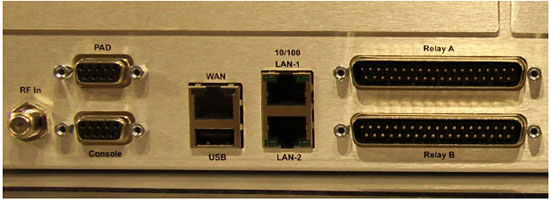
| Below is a close look at the left rear of the receiver. RF on the far left, with your PAD Data and Console port. In the center, WAN and USB connections. USB can be used to transfer files. | On the center right is where you will typically connect your XDS receiver to your network using an RJ45 CAT5e cable, typical of most internet connections. On the right, the Relay ports. Use your XDS manual for connections. |
Let Us Help You
I want to:See Images of The XDS Receiver Download PDF
The XDS-PRO4-Q Receiver is the latest revision of the XDS family that ESPN Affiliates are using. For a greater detail of the receiver, please refer to the Quick Start Guide or the manufacturer manual. This is just a one sheet look at the most common use of the rear panel.
The rear panel connections are all easy connections to make. The audio is output on ports A-D and will be balanced analog. See the pinout below. Your DB9 connectors will need to be DB9F.
| Below is a close look at the left rear of the receiver. RF on the far left, with your PAD Data and Console port. In the center, WAN and USB connections. USB can be used to transfer files. | On the center right is where you will typically connect your XDS receiver to your network using an RJ45 CAT5e cable, typical of most internet connections. On the right, the Relay ports. Use your XDS manual for connections. |